Runlines
How it works
How Runlines works, from pasted sides to off book
The whole loop is paste, pick, run, repeat. This page walks through each screen, including the exact script layouts Runlines understands, so you know before you download whether your sides will import cleanly.
1. First launch: four questions and a six-line scene
The first time you open Runlines, Echo, a parrot, asks four questions in a speech bubble. Tap an answer to select it, change it if you like, and tap Continue:
- Nobody to run lines with? What are you working on? Audition sides, days away; a scene for class or a show; a monologue to get off book; or a speech you have to give.
- When is it? This week, in about two weeks, in about a month, or no date yet.
- How do you usually learn lines? Reading them over and over, a friend runs them with you, recording yourself, or cramming the night before.
- What trips you up? Missing your cue, the long speeches, the order of the beats, or going blank from nerves.
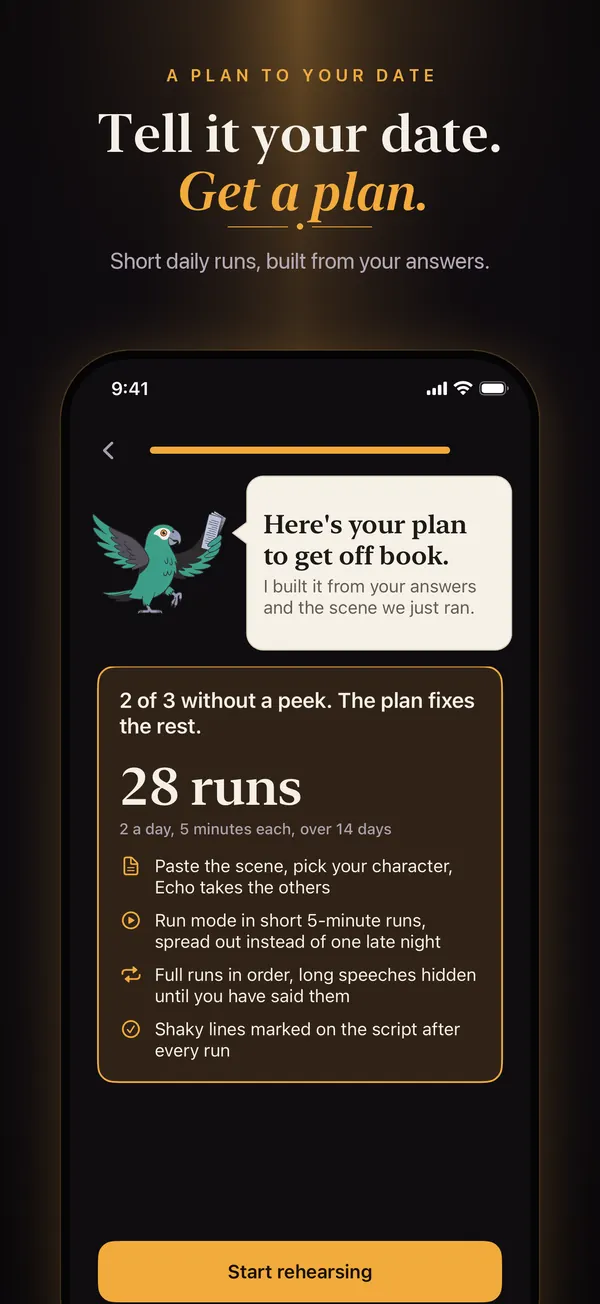
Then you run a real six-line scene: you play MARA, Runlines reads DEV. After that you get your plan, for example "28 runs: 2 a day, 5 minutes each, over 14 days", and Start rehearsing takes you to your Scripts list. Echo appears only in these first screens; the rest of the app is your scripts and nothing else.
2. Add your script
On the Scripts list, tap Add a script. Paste the text, or tap PDF or TXT to pick a file from your iPhone or iCloud Drive, give it a title, and tap Save script. Runlines reads the text out of a PDF on the phone with Apple's PDFKit; nothing is uploaded. The free version holds one script of your own plus the built-in sample scene, "The ten-fifteen (sample)".
The two layouts Runlines reads
Most sides and scripts use one of two layouts, and Runlines detects which one you pasted. Name on the same line, followed by a colon:
JUNE: The lights in the hall are still on.
TOMAS: I left them on for you.
JUNE: You never leave anything on for anyone.
Or the name on its own line, with the speech underneath, the way screenplays and most audition sides are printed:
JUNE
The lights in the hall are still on.

TOMAS
I left them on for you.

JUNE
You never leave anything on for anyone.
A few rules make the difference between a clean import and a muddle:
- Names in capital letters. JUNE, DR. HALE, and MARY-ANN work. "June" in lowercase is treated as part of a speech.
- Extensions are dropped. "JUNE (V.O.)" and "JUNE (CONT'D)" both count as JUNE, so her lines stay together.
- Stage directions on their own line are skipped when they are wrapped in parentheses or square brackets, such as "(She turns off the lamp.)".
- Long speeches stay whole. A speech that wraps onto several lines is joined into one line until the next name.
If your sides use another layout, tidy the first few names into one of these two and paste again.
If a PDF will not import
If Runlines says "No text found in that PDF. Paste the lines instead.", the PDF is a scan: a photo of a page with no text inside it. Runlines does not do OCR. Open the email or document the sides came from and copy the text, or ask for a text PDF. If you can select words in the PDF in the Files app, Runlines can read it.
Monologues and speeches
Turn on "No character names (monologue or speech)" when you add the script. Every paragraph, separated by a blank line, becomes one of your lines. Nothing is read aloud, because there is no other part; each paragraph stays covered until you say it, with the paragraph before it on screen so you know where you are. If you paste text with no recognizable character names, Runlines treats it this way on its own. The guides on memorizing a monologue and memorizing a speech explain how to split one into paragraphs that are easy to learn.
3. Pick who you are
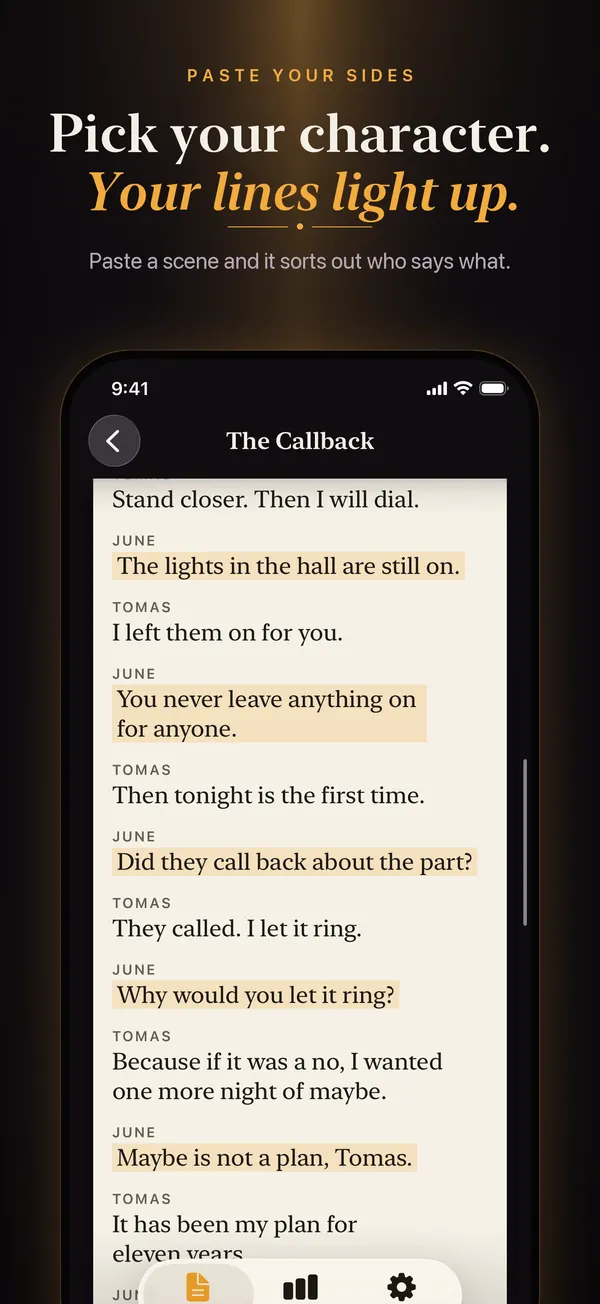
Open the script. Under "You are", every character is listed in the order they first speak. Tap yours. Your lines are highlighted in amber on a paper-white page set in serif type, so it reads like printed sides, and every other character's lines become the parts Runlines will read.
The script screen also shows the run counter ("2 of 5 free runs left this month" in the free version), the off book, learning, and shaky counts for your lines, and the Pro options: cue-only, word-by-word reveal, Record my lines, and a voice for each character.
4. Run the scene
Tap Run the scene. A run is one pass through the scene from the top.
- Partner lines are read aloud. The screen shows "Reading TOMAS's line. Tap to skip" if you want to move on.
- At your line, the line before it stays on the card and yours appears as dark blocks, one per word.
- Say it out loud, then tap Got it. If you go blank, tap Reveal to see the whole line; that counts as a peek. With Runlines Pro, Reveal word by word shows one word per tap.
- "Line 2 of 6" and "0 of 3 clean" at the top keep count as you go. To stop early, close the run with the X at the top; the lines you reached still count.
In the free version each run uses one of your 5 runs for the month, and a script longer than 40 lines runs its first 40 ("Free plan runs lines 1 to 40 of 48"). Runlines Pro removes both limits.
5. After the run
The run ends with "END OF SCENE" and a count like "5 of 6 lines without a peek." Back on the script page, each of your lines now carries a mark: off book, learning, or shaky. What each mark means.
Your plan from the first launch sets how many runs a day to aim for. The Scripts list shows today's runs against it ("1 of 3 done today"), and the Progress tab shows your next rehearsal and this month's runs. With Runlines Pro, Progress adds a mastery percentage for each script, a dated history of every run, and a daily reminder at the time you pick.
6. Where your scripts live
On your iPhone, in the app's own storage, and nowhere else. There is no account and no server holding a copy. Your scripts, marks, and recordings are included in your normal iCloud or computer backup, so restoring a backup to a new iPhone brings them along; setting the new phone up from scratch does not. Everything works in airplane mode except buying or restoring Runlines Pro. The privacy policy has the details, including the one thing that does leave the phone: an anonymous record of subscription purchases.