Runlines
Scene partner voices
A scene partner that reads the other lines and waits for yours
Runlines reads every other character's lines out loud with the text-to-speech voices built into your iPhone. When it reaches one of your lines it stops, shows your line as covered blocks, and waits. You say the line, tap Got it, and it reads the next part. This is the core of the app, and it is in the free version.
What a run sounds like
You tap Run the scene
Runlines starts at the top. If the first line belongs to another character, it reads it aloud and the screen says, for example, "Reading TOMAS's line. Tap to skip."
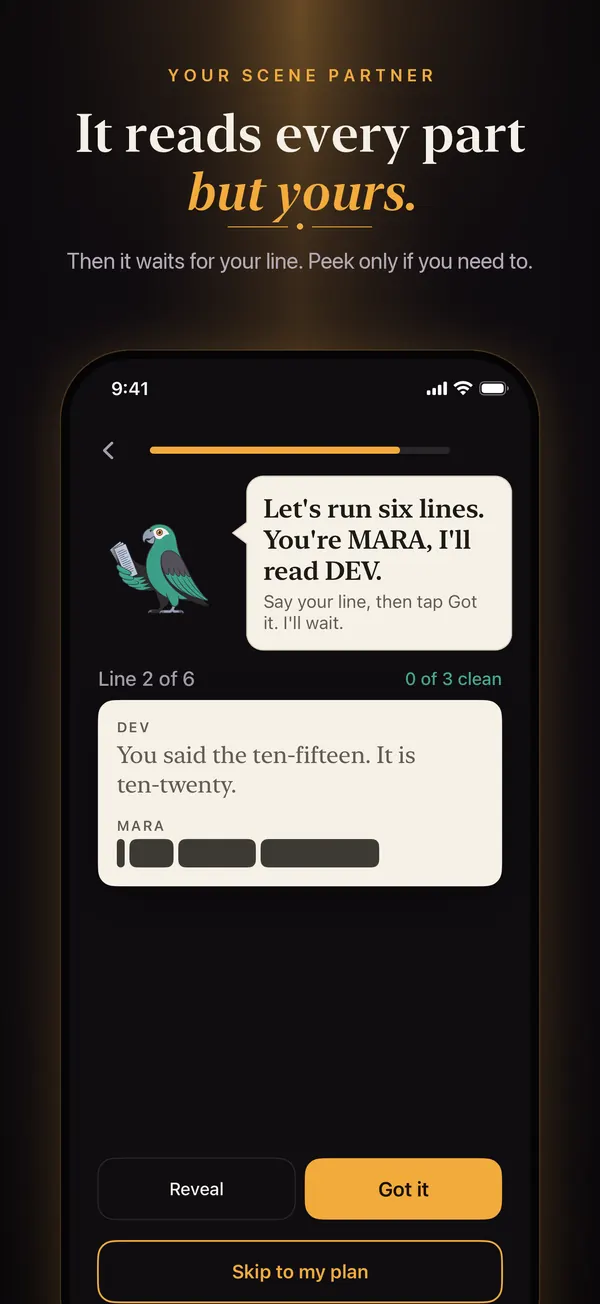
Your line comes up covered
The line before yours stays on the paper card, dimmed, and your line appears as dark blocks, one per word. There is no timer. Runlines waits until you do something.
You say it, then tap
Say the line out loud. Tap Got it if you said it without looking. Tap Reveal if you went blank; the line appears and that line counts as a peek on this run.
The scene moves on
After a short pause the next partner line is read. At the end you see "END OF SCENE" and a count such as "5 of 6 lines without a peek."
The voices it uses
Runlines speaks with Apple's speech synthesizer, the same system voices iOS uses for Spoken Content. The voices run on the iPhone itself, so a run needs no internet and your script is never sent anywhere to be spoken. Which voices you have depends on your iPhone and on what you have downloaded.
- Free: pick one partner voice in Runlines under Settings, Partner voice. It reads every part that is not yours.
- Runlines Pro: give each character a different voice from the script screen, under Voices, so a three-person scene sounds like three people. Pro also adds Speech rate and Pause between lines in Settings, for a partner who talks slower or leaves you more room.
How to get a better-sounding voice
The default voices are the most robotic ones. In iPhone Settings, open Accessibility, then Spoken Content, then Voices, then English, and download a voice marked Enhanced or Premium. Then choose it in Runlines under Settings, Partner voice. The download is free and comes from Apple.
What it reads and what it skips
- It reads the words of each line. It does not read the character names.
- A stage direction on its own line, in parentheses or square brackets, is left out when you import the script. A direction in the middle of a speech is read like any other words, so delete it from the pasted text if it gets in the way.
- On a monologue or speech there are no other parts, so nothing is read aloud. Each paragraph waits for you in turn.
What it does not do
The voices do not act. They are clear and steady, and they will not give you a sob, a sneer, or a laugh to play off. Think of a patient reader at a callback. Runlines also does not listen to you: there is no speech recognition, and the microphone is only used in Record mode while you hold the record button. Whether a line counts as clean depends on your tap, so be strict with yourself about paraphrasing.
Why a reader beats rereading
Reading your lines silently trains you to recognize them on the page. Hearing a cue in another voice and answering it from memory trains the thing you need in the room: the line arriving on time, in response to someone else. Our guide on running lines by yourself compares this with voice memos, cover cards, and a friend on a video call.