Runlines
 for iPhone
The run lines app that reads every other part and waits for yours
Runlines is an iPhone app that runs lines with you when nobody else can. It is a scene partner for actors with audition sides due, drama students with a scene for class, and anyone with a monologue or a wedding speech to learn. Paste the text or open the PDF, tap the character you are playing, and Runlines reads every other character out loud. At each of your lines it stops, with your words covered, until you say the line and tap Got it.
- Free: 5 runs a month and one script of your own, with no account
- Scripts stay on your iPhone and are never uploaded
- After every run, each of your lines is marked off book, learning, or shaky
The problem
The audition is Thursday and nobody is free to read the other part
Your roommate read it once, flat, while checking their phone. The voice-memo trick means recording every other character yourself and scrubbing back each time you go up. Reading the sides over and over feels like progress until the page is gone and the cue goes right past you.
Lines stick when you say them out loud, from memory, as the answer to the line before. That part has always needed a second person. Runlines is the second person: it does not sigh when you ask for the scene one more time, and it is awake at midnight when the sides finally arrive.
What a run lines app does
To run lines is to say your part from memory while someone else reads every other character, so you hear each cue and answer it. A run lines app takes over the reader's job: it holds the script, speaks the other parts, keeps your line out of sight, and waits for you. Runlines does exactly that, on your iPhone, with the voices already built into it. If a friend has asked you to run lines with them and you are not sure what that involves, the guide on how to run lines with someone covers the reader's side.
What it does
What Runlines does that a highlighter and a voice memo cannot
It reads every part but yours
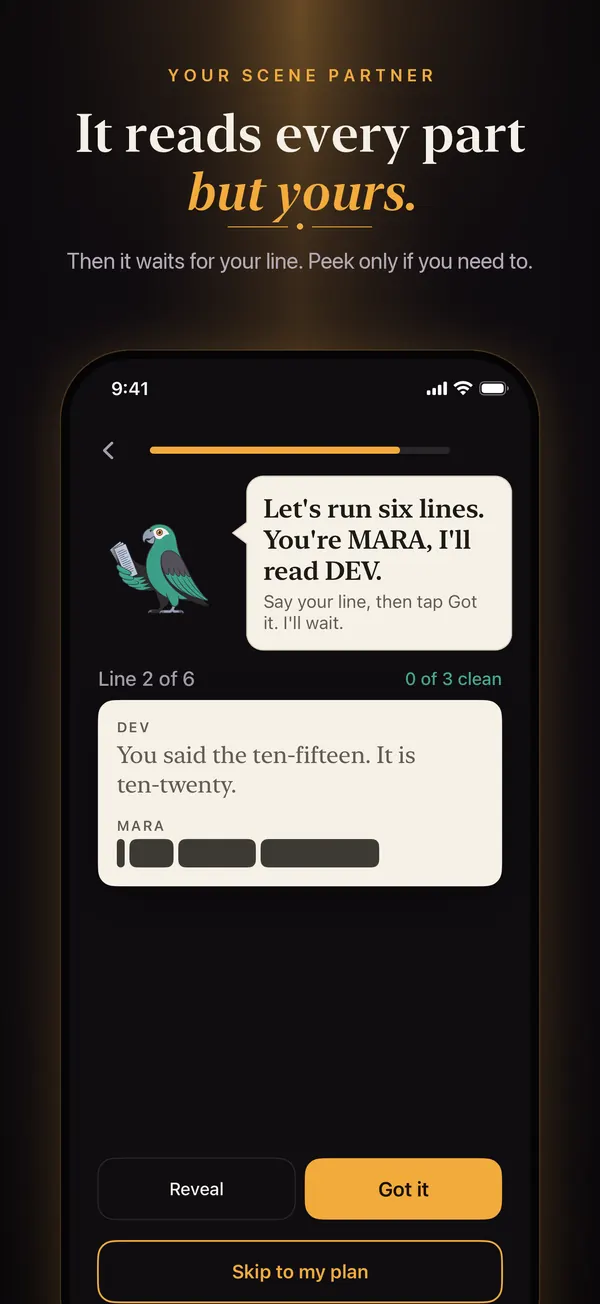
Runlines speaks the other characters' lines with the voices already on your iPhone, so there is nothing to record first. At your line it waits as long as you need. It does not listen to you or grade you: you tap Got it when you said the line without looking.
Scene partner voicesYour line stays covered until you ask
Your line shows as word-shaped blocks, so you can tell how long it is but not what it says. Reveal shows it and counts as a peek. With Runlines Pro, Reveal word by word shows one word at a time, so you peek at the first word instead of the whole speech.
How a run worksIt tells you which lines are still shaky
After each run, every one of your lines is marked off book, learning, or shaky, worked out from your own taps. The night before, you run the four lines you keep dropping instead of the whole scene again.
Off book, learning, shakyWho it is for
Four things people learn with Runlines
These are the four answers to the first question the app asks, "What are you working on?" Each one changes the plan Runlines gives you.
Audition sides, days away
Paste the sides the casting office emailed, or open the PDF. Answer "This week" and the plan asks for three short runs a day.
Learn lines for an audition in 2 daysA scene for class or a show
Your scene partner has rehearsal, a shift, or a phone that goes to voicemail. Runlines reads their part every night until you meet up.
How to run lines by yourselfA monologue to get off book
Turn on "No character names (monologue or speech)" and every paragraph becomes one of your lines, hidden until you say it, with the paragraph before it on screen.
How to memorize a monologueA speech or a toast
Paste the toast with one paragraph per section. Runlines covers each section until you have said it and shows which ones still slip.
How to memorize a wedding speechHow it works
From pasted sides to off book in three steps
-
Paste the sides and pick who you are
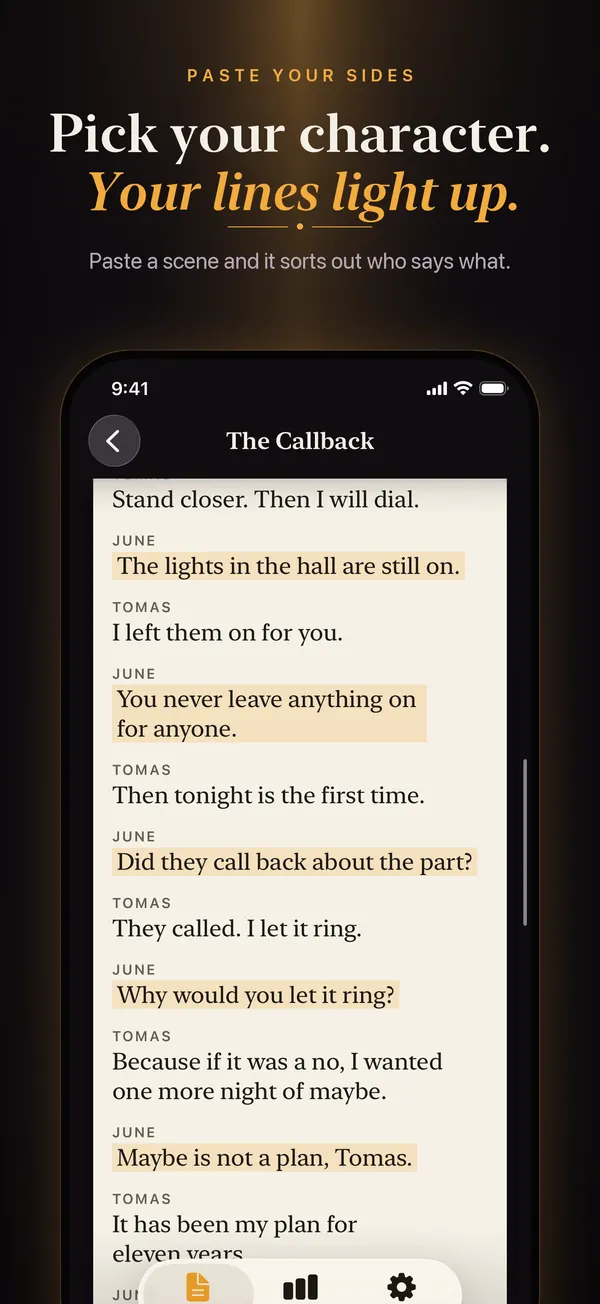
Tap Add a script, paste the text or choose PDF or TXT, and save. Under "You are", tap your character. Your lines light up on a paper page set in serif type, like printed sides.
-
Run the scene and say your lines out loud
The other parts are spoken; yours are covered. Say your line, tap Got it, and the scene moves on. Go blank, tap Reveal. One run is one pass through the scene, and it ends with a count like "5 of 6 lines without a peek."
-
Run the shaky ones again tomorrow
Tell Runlines your date on first launch and it sets the pace: three runs a day for an audition this week, two for a show in two weeks, one for a month out. The script page shows which lines are still shaky.
The full walkthrough, with the two script layouts Runlines reads
Pricing
Five free runs a month, or Runlines Pro for unlimited
The free version does the core job: the other parts read aloud, your lines covered, the count after each run, and off book, learning, and shaky marks on every line. It includes 5 runs a month (they come back on the 1st), one script of your own plus the built-in sample scene, and scripts up to 40 lines in full. There is no account and no sign-in.
Runlines Pro adds unlimited scripts and runs, Record mode, cue-only runs, word-by-word reveal, a voice for each character, speed and pause controls, mastery and run history, and a daily reminder. It costs $7.99 a month, or $39.99 a year with a 7-day free trial. Either plan renews automatically until you cancel in iPhone Settings at least 24 hours before the period ends.
Honest limits
What Runlines does not do
- It does not listen. There is no speech recognition. You say the line and tap Got it, or tap Reveal if you go blank. The off book and shaky marks come from those taps, so they are only as strict as you are.
- The voices do not act. Runlines reads with the text-to-speech voices built into iOS. They are clear and steady, and flat. Think of a patient reader at a callback, not a partner giving you something to play off.
- It cannot read a scanned PDF. A scan is a picture of a page with no text inside. Copy the text from wherever it came from and paste it instead.
- It is for iPhone only. There is no Android, iPad, Mac, or web version.
- It does not sync or share. Your scripts live on one iPhone. They move to a new phone with your iPhone backup, and nobody else can see them.
Questions
Questions people ask before they download
Is there an app that reads the other character's lines so I can run lines by myself?
Yes, that is the whole job of Runlines. Paste the scene, tap your character, and it speaks every other character's lines with the iPhone's built-in voices, then pauses at each of yours with the words hidden. The voices are steady rather than dramatic, more callback reader than scene partner. How the reading works.
What does "run lines with me" mean?
It is an actor asking you to read the other characters' lines out loud while they say their own from memory. You hold the script, read plainly, and give them the first few words if they call "Line." When there is nobody to ask, an app that runs lines with you does the reading instead. How to run lines with someone.
How do I learn my lines for an audition in 2 days?
Understand the scene first, then learn it in beats of three to five lines, out loud, against the cue, in several short sessions across both days. On day two, run it from the top until two runs in a row are clean. The session-by-session plan.
Can I paste my audition sides or open the PDF the casting office sent?
Both. Runlines pulls the text out of the PDF on your iPhone and reads the two usual layouts: "NAME: line", or the name on its own line above the speech. A scanned PDF has no text inside, so paste those instead. The import rules.
How do I memorize a monologue or a wedding speech when there is nobody else in it?
Split it into beats or sections, learn one at a time out loud, and drill the first words of each so the joins never go blank. In Runlines, turn on "No character names (monologue or speech)" and every paragraph is hidden until you say it. Guides: monologues and speeches.
How much does Runlines cost after the free trial?
The yearly plan is free for 7 days, then $39.99 a year; the monthly plan is $7.99 a month with no trial. Both renew automatically until you cancel in iPhone Settings at least 24 hours before the period ends, and the free version keeps 5 runs a month either way. Pricing and more answers.