Runlines
Cue-only runs Pro
Cue-only runs: hear the last three words, then say your line
In a cue-only run, Runlines skips the partner lines you do not answer and cuts the line just before each of yours down to its last three words. You hear the cue, you come in. It is the drill for the actor who knows every line and still misses the moment to say it.
What changes in a cue-only run
In a normal run every partner line is read in full. In a cue-only run:
- A partner line that comes right before one of yours is cut to its last three words.
- A partner line that is not followed by one of yours is skipped, so long stretches between your lines go by in a second.
- Your line is covered, and Reveal and Got it work exactly as in a normal run.
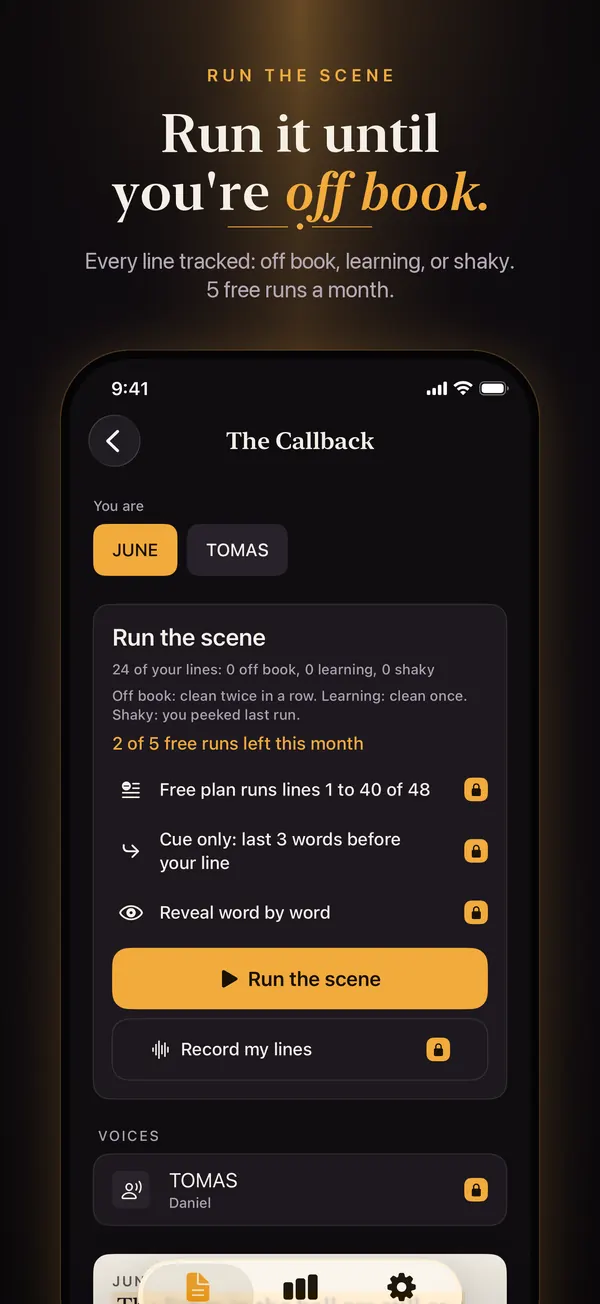
Here is the built-in sample scene, where you play MARA:
Why drill the cue and not just the line
A line you can recite from the top of a page is only half learned. In the room it has to arrive when the other actor finishes, without a gap and without you watching their mouth for the end. That timing hangs on the last few words of their line. Cue-only runs make those words the only thing you hear, so your line gets tied to them instead of to the page. It is the same idea as a cue card with the cue on the front and your line on the back, done by ear.
For the full technique, with examples and the trap of two cues that end the same way, read Cue lines: what they are and how to learn yours.
When to use it
- After a few full runs. Learn the scene with the other parts read in full first. Once you know what the scene is about, switch to cue-only to tighten your entrances.
- When missing your cue is the problem. If you answered "Missing my cue" to "What trips you up?" on first launch, your plan card suggests this drill.
- For a quick pass before you go in. A cue-only run of a long scene takes a fraction of the time of a full one.
It does nothing on a monologue or speech: there are no partner lines to cut, so those scripts run in order with the paragraph before each one on screen.
How to turn it on
Open a script, pick your character under "You are", and turn on "Cue only: last 3 words before your line" before you tap Run the scene. The same switch is in Record mode, where it trims the partner lines around your recorded ones. Cue-only runs are part of Runlines Pro; in the free version the switch is visible with a lock badge and tapping it opens the Runlines Pro screen. See pricing.